|
Follow the instructions below to search through the claim file.
| 1. | Select Search  Define Search in the main menu. Define Search in the main menu.
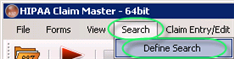
The "Define Search" menu |
| 2. | The following screen will appear. It will let you define search conditions.
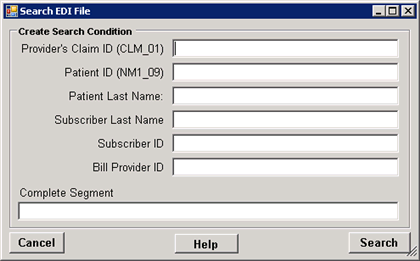
The "Search EDI File" Screen |
| 3. | Specify your search criteria. You can search for: |
| • | The Provider's Claim Number or Patient's Record number that is stored in CLM_01 segment |
| • | The Patient Control Number or Patient's ID |
You can specify multiple search conditions.
| 5. | The HIPAA Claim Master parse through the file and display the claim that fulfills this criterion. If there are many claims, it will display each claim that has this condition. |
|