The HIPAA Claim Status Checker can accept command line arguments. The following is the list of the command line arguments; they must be separated by commas.
1. The first command line argument is the filename or the directory path. If not applicable (such as when querying the database), leave blank.
If this is the only argument used, the file will be shown on screen:
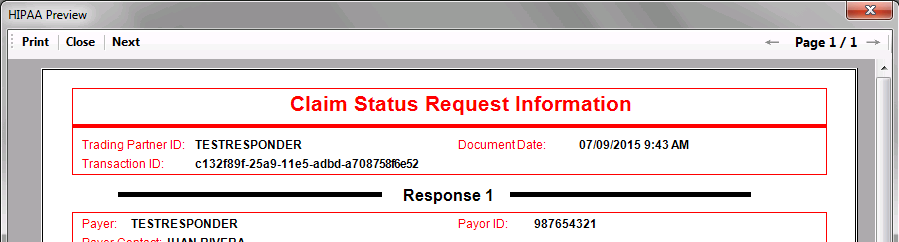
2a. The second argument or combination of arguments contains the processing options. Querying database in order to create a 276 EDI file requires additional arguments.
P - Print.
X - Export to database.
I - TIFF file.
Note: using multiple processing options is possible.
Example: To both export a Claim Status Response to the database and print it:

2b. Building a 276 Claim Status request will require arguments 3, 4, 5, and 6 to be filled.
Q - Database query.
E - Create EDI in conjunction with Q. The query results will be used to generate a 276 Claim Status Request.
Example:

This query will use all the Claim Status Requests in the EDI_ClaimStatusHeader table to create a 276 Claim Status Request EDI file.
3. The third command line argument is the output filename. A relative address can be used and will be based on your default Output Directory.
4. The fourth argument is your Query should you should have "Q" as a second argument.
5. The fifth argument is the target trading partner. This works only with the EDI Exchange module enabled. If omitted, the last receiver used in the Create 276 Files window.
6. In the sixth argument you specify whether to use "T" Test or "P" Production database connection if you have "Q" for query as the second argument.