The default company is the identity you assume as the sender when creating EDI files. This affects the ISA, GS, and NM1 sender segments. A single entity may have a need to act as multiple sender identities and so has a need to change the information in the EDI envelopes.
The default company can be changed using command line arguments, affecting the ISA and GS sender ID segments.
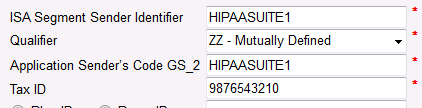
Sender ID segments in Company Setup
To change the default company, a single argument is needed. "Setcompany" followed by the company ID of the company you wish to set.
"setcompany <ID>"
The Company's ID in this case is not its EDI identifier, but the value of the ID row in the COMPANY_SETUP table. It can also be found in the Company Setup window:
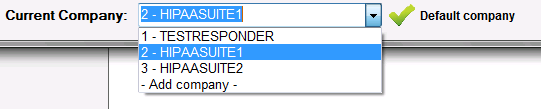
Company selection in Company Setup
Example
The command argument setcompany 3

will set the default company to ID = 3, which is HIPAASUITE2 in the example picture above. The log entry for this command will be

Excerpt from log. Default company changed.