You can reject a request on a number of levels.
· If you do not have a Trading Partner Relationship with the sender, you would reject on the UMO level.
· If your system is down and you cannot answer at the current time, you would choose the second option, "System Level".
· If the provider is unknown to you and you have a policy not to respond to requests from out of network providers, you would choose "Requester Level".
· If you do not recognize the subscriber or patient or the information is wrong, you would answer at the "Subscriber" or "Dependent" level.
· If you reject because the service provider is unknown, not in your network or the like, you would reject at the "Provider level".
· Finally you can reject on the service level, for example, if there is no coverage for the requested services.
You can have several reasons to reject a request. Each time you have to provide three pieces of information:
· Is the request as such valid?
· What is the reason for the rejection?
· What is the action that the requester should take?
We we press the "Reject Request" button, the following screen comes up:
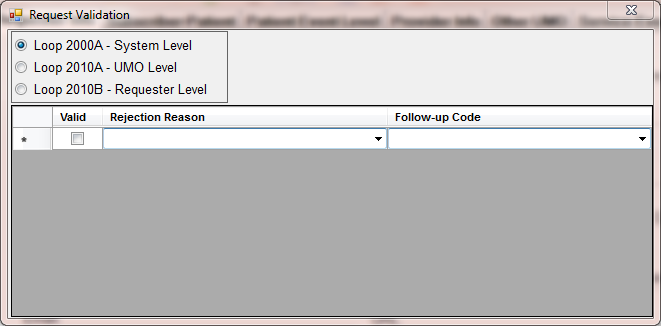
The rejection screen at the System, UMO and Requester level
Let's take a closer look at the functionality. The first option says Loop 2000A-System level. Here we list rejection reasons on the highest, the system level
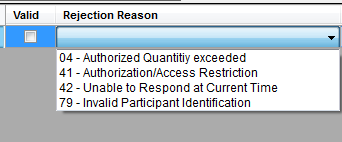
The rejection reasons on the system level
When we check another option, Loop 2010B-Requester level for example, then the options change.
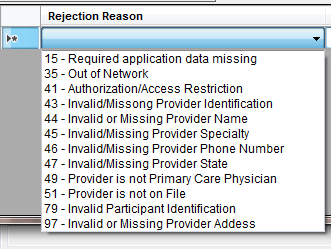
The rejection reasons on the requester level.
For example a rejection of an out-of-network provider's authorization request would look like this
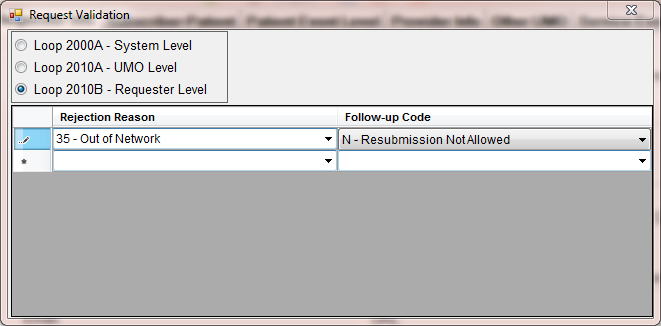
A rejection of an out-of-network provider's authorization request
When we save the request we see now in the work place grid that the request has been rejected

The authorization status is set to 'Rejected'
The resultant EDI file will now contain a AAA segment in the 2010B loop with this information.
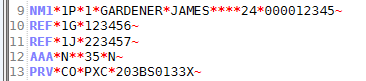
The EDI file with the AAA segment informing the requester about the rejection reason.
If we again load the request for editing we see now that it has been processed. This important information is also saved in the database.
