|
<< Click to Display Table of Contents >> HIPAAsuite RealTime Server |
  
|
|
<< Click to Display Table of Contents >> HIPAAsuite RealTime Server |
|
The HIPAAsuite RealTime Server is a is CAQH CORE Phase I and Phase II compliant EDI transfer host. It is meant to be used in conjunction with HIPAAsuite's HIPAA Eligibility Responder, HIPAA Claim Status Responder, and EDI Exchange applications.
HIPAAsuite RealTime Server will accept any incoming CORE compliant MIME or SOAP messages and extract the payload, which are HIPAA X12 005010X279A1 Eligibility and Benefit Request (270) or HIPAA X12 005010X212 Health Care Claim Status Request (276) transaction sets.
It will then relay the payload to the appropriate HIPAAsuite Responder application, which will parse and process the EDI file and generate responses and/or acknowledgments (999), as appropriate.
The HIPAAsuite RealTime Server will then (in the case of a real time transaction) wrap the response, or acknowledgment EDI file in the case of a failed EDI validation for the incoming request, and return it to the receiver or (in the case of a batch mode transaction) wait for an incoming response request or acknowledgment request to send back the appropriate EDI file.
HIPAAsuite RealTime Server is able to parse and respond to both request types (RealTime or Batch) wrapped in either CORE specified envelope (MIME or SOAP).
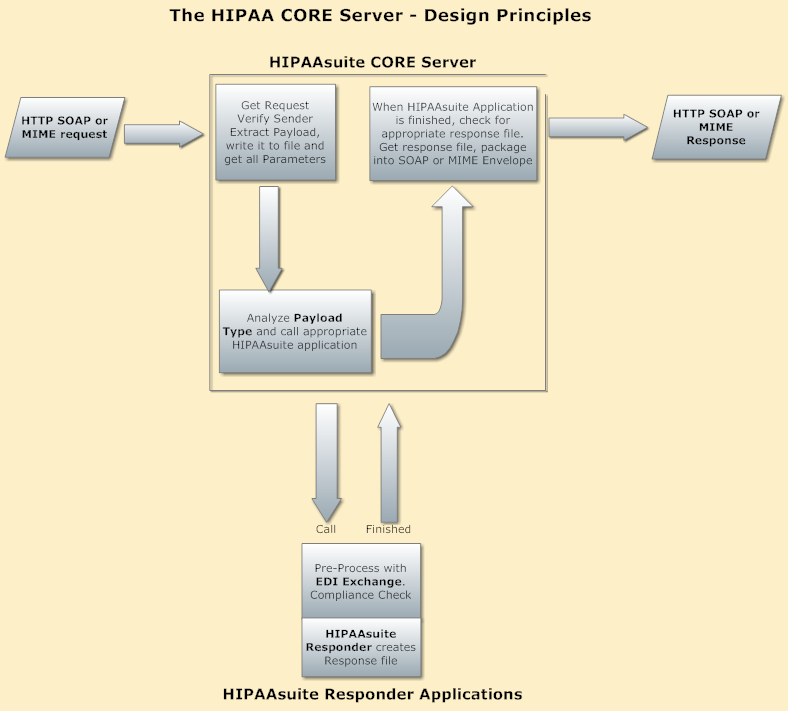
Basic design of the HIPAAsuite RealTime Server
On incoming requests, the HIPAAsuite RealTime Server will initially validate the sender; HIPAAsuite RealTime Server uses username/password authentication to validate trading partners. One might think that this is insecure to transmit a user's name and pass word over the internet, but since the transmissions itself is encrypted through the https standard, it is deemed save. We will soon implement a certificate-bound user verification with message level encryption.
HIPAAsuite RealTime Server is a port listener. This means that it constantly watches out for incoming communication attempts in the MIME or SOAP standards. Once it receives a request, the incoming message is parsed for metadata which is contained within the SOAP or MIME envelope and the payload which is extracted and saved. Afterward, HIPAAsuite RealTime Server calls the appropriate HIPAA Suite software to process the file and to generate the results which are either returned in real time or stored for later transmission as part of a batch transaction. HIPAAsuite RealTime Server's communications with the HIPAA Suite Responders is completely compartmentalized and will function so long as you have installed the appropriate HIPAAsuite responder application to deal with the expected incoming EDI requests; i.e., HIPAA Claim Status Responder is not required to respond to 270 Eligibility and Benefit requests and vice versa. The HIPAAsuite RealTime Server requires and builds upon the HIPAAsuite EDI Exchange application.
In addition to the CORE Phase I and II transactions, we built the HIPAAsuite RealTime Server to accept all HIPAA transactions. All 12 HIPAA transactions can be transmitted with HIPAAsuite RealTime Server and passed on to the appropriate HIPAAsuite Software application. For example, 837 claim files could be transmitted and passed on to the HIPAA Claim Master. We believe that SOAP and MIME can replace FTP as the preferred transport method of HIPAA EDI files and we designed HIPAAsuite RealTime Server accordingly.
HIPAAsuite RealTime Server is built on the Windows Communication Foundation (WCF) and written entirely in C#. WCF provides tools to implement and deploy a service-oriented architecture, ideal for distributed computing where services have multiple remote consumers; the clients themselves can also consume services from multiple servers. This makes WCF a great tool for building EDI exchange services and consumers, especially so given the default message envelopes are SOAP in WCF. WCF builds and publishes a WSDL (Web Services Description Language) file that can be accessed by appending "?WSDL" to the service's address. A service's WSDL provides a machine-readable description of how the service can be called, what parameters it expects, and what data structures it returns. Given that all CORE-compliant services and servers will be using the same set of EDI transactions, any WSDL describing a CORE-Compliant service will describe all CORE-Compliant services.
WCF clients connect to a service using a communication endpoint, a discoverable interface that separates the means of communication from the communication subsystems. Through these endpoints a layer of abstraction is created between the WCF environment and any client or consumed service. HIPAAsuite RealTime Server uses four endpoints in all, one each for the real time and batch modes for both SOAP and MIME envelopes. Since MIME real time and batch envelopes use a custom parser, both may use the same address. SOAP real time and batch, however, may not. Custom endpoints are used to handle SOAP messages for greater control over the SOAP headers used for authentication purposes; SOAP real time and SOAP batch use different envelopes, although both may be called SOAP. The SOAP batch envelope is encoded with MTOM (Message Transmission Optimization Mechanism), a SOAP optimization feature for sending and receiving large payloads which requires the SOAP message to be sent within a MIME envelope.
For ease of installation, HIPAAsuite RealTime Server is self-hosted, which means it uses any host computer as a server and does not require additional web services or servers like Microsoft Internet Information Services (IIS) or Apache. An early prototype was built as a local windows service, but was discarded to avoid the complexity of configuring access to a service which does not inherently run in the context of any particular user that would need administrative permissions to perform functions like reserving ports for the hosting of endpoints. As a self-hosted application, HIPAAsuite RealTime Server can be run easily with administrative credentials without the need for additional setup steps to configure the properties of a service or set up a web service in IIS. All HIPAAsuite RealTime Server needs are the HIPAAsuite responders, EDI Exchange, and the setup on the program itself.
HIPAAsuite RealTime Server is a formless windows form application. This means it is an application without an initial or main form to present an interface to the user; it remains running in the background. HIPAAsuite RealTime Server does present a notification icon when running, from which it can be configured. HIPAAsuite RealTime Server also has an optional debug console from which all incoming and outgoing EDI transactions are displayed along with several useful process indicators. This model was selected for HIPAAsuite RealTime Server because it is cuts back on resource overhead and is non-intrusive. The only configuration file it draws from stores user-specified options; unlike most web services it uses no webconfig file, all information regarding hosts, endpoints, behaviors, and contracts is set programmatically according to the user's preference for configuration on the fly. An option to open a test host on a port separate from the default secure host is provided and is the only occasion in which an unsecured host will expose an endpoint. This unsecured host coupled with the debug console make a useful and indispensable tool for inspecting incoming and outgoing envelopes in a test environment or, indeed, testing for CORE compliance.
In the following sections you will learn how to install, configure, and utilize HIPAAsuite RealTime Server.