EDI files do not carry the description of codes since EDI is all about saving space. But since the codes are available commercially or from CMS, you can link tables with those codes in your database application and have the HIPAA Claim Master look up the description. These tables needs to be in the database defined while Setting up Database Connection.
Descriptions in the standard Forms
The UB92 and UB04 as well as the dental forms have the "Description" field for the line item revenue or procedure codes. For the CMS-1500 forms one can put the description in the upper half of the field locator 24 D.

A part of a UB04 with revenue code descriptions

Dental Procedure Code Descriptions

A part of the CMS-1500 with the description filled in from the database
The CMS-1500 option is separate and can be selected in the Specific Options (the "CMS-1500: Display procedure description in 24D" check-box). Refer to Configuring Specific Options.
Linking the Procedure Code Table
Acceptable Codes:
| • | HCPCS codes |
| • | CPT procedure codes. |
| • | All dental procedure codes. |
Tip: Using the code look-up might slow down your application depending on the speed of your database. You can undo the code lookup by deleting the table name and clicking the "Save" button.
Follow the instructions below to show code descriptions.
| 1. | Select the Data Base  Code Look-up Table in the main menu. Code Look-up Table in the main menu.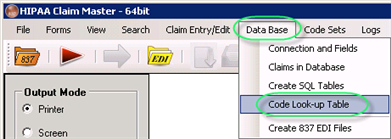 The "Code Look-up Table" menu |
| 2. | You will see the following screen: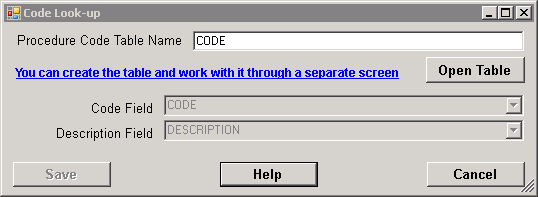 The "Code Look-up" screen |
If you don't have a table already with the procedure codes, you can create it in the claim master application. You see the sentence in blue "You can create the table....". Click on this and the following form will come up.
| 3. | Type the name of the table and click the "Open Table" button.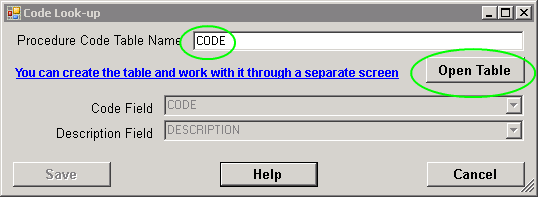 The "Open Table" button |
| 4. | If the table is found, then the drop-down boxes for "Code Field" and "Description Field" will be populated with all the available fields in your table. You can then choose the field that will carry the code and description.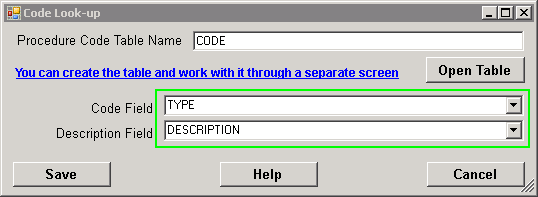 The "Code Field" and "Description Field" values populated |
| 5. | Click "Save." 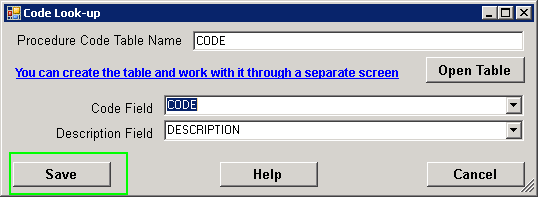 The "Save" button |
From now on, the HIPAA Claim Master will fill in the code description fields.