The size of image files is largely determined by the image quality. The better the quality, the more information is stored in the image file. You can define the quality of the image and the image size in the "Image Options."
Select Image  Image File Options in the main menu to access the "Image Options" window.
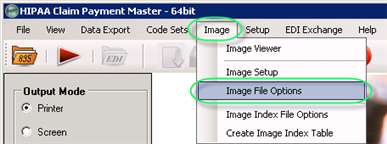
The "Image File Options" menu
You can define the image options described below.
Once the options have been set, click "Save."
Options for TIFF
| • | Color Depth — You can change color depth of the image (black / white, 4 bpp / 8bpp / 24bpp / 32bpp). |
Note: TIFF in Window's GDI library does not work with 16 bpp (bits per pixel). Color depths set lower then 16 bpp results in some losses in image quality.
Reference: The black-and-white (bi-level) image means that for each pixel (picture element) in the image we do not need three bytes as in the true color image (over 16.7 million colours), but only one bit that is 1/24 part of the pixel size from the true colour image. The one-bit pixel can express only black or white colors, nothing more.
| • | Compression Algorithm — You can use compression with TIFF files: LZW and Packbits are used for all Colors, CCITT4 for black-and-white. |
| • | Photometric Interpretation — For the black-and-white and grayscale images (when "Black/White" or "4 bpp" options are selected as color depth), you can specify the intended interpretation of the image pixel data. Select one of the following options: |
| • | White is Zero — The minimum sample value is displayed as white. |
| • | Black is Zero — Default value. The minimum sample value is displayed as black. |
| • | Image Resolution — You can change horizontal and vertical resolution of images from 96 to 300 dpi (dots per inch). Default resolution is 200 dpi. |
Note: Theoretically we could use even higher resolutions, but it will slow down processing significantly result in approximately the same result in quality.
Options for PDF
| • | Use Content Compression — Checking this option does result in considerably smaller files. |
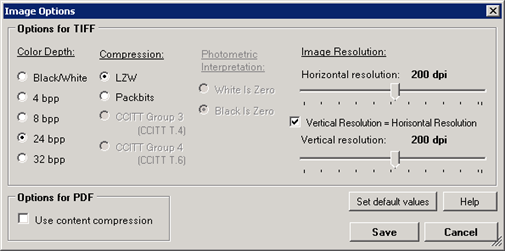
The "Image Options" window