|
To generate an 834 file using the Database, the following command line arguments are needed in order:
| 1. | "EDI" - To flag the command for EDI file creation. |
| 2. | "QE" - Indicates the EDI file is to be built form a query. |
| 3. | Resulting filename - A filename for the resulting file. A fully qualified path may be used. A relative address (ex: "\834forTradingPartner\834.edi") will result in the file being written to the EDI Root directory. |
| 4. | Query - The query to be used to build the EDI file. |
Example of creating an EDI file from a database query:

EDI file creation command specifying records with a query
The above example has:
| • | "EDI" as the first argument, flagging this command as a file creation command. |
| • | The second argument is "QE", meaning that an EDI file is to be created using the results from a SQL query. |
| • | Argument 3 is the filename for the resulting file. Since D:\EDI\834TEST.edi is a fully qualified path, the file is not written to the EDI Root directory and instead uses the specified path. |
| • | The fourth argument is the query whose results will be used to create the file. |
| • | The fifth argument is the receiving Trading Partner. |
and will result in an EDI file named "834TEST.edi" in "D:\EDI\" containing the results of database query "SELECT * FROM edi_claimpayment". The following is the log entry created by this command:
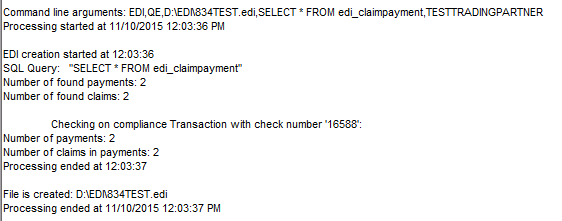
Excerpt of HIPAA Claim Payment Master log.
|