The HIPAA Premium Payment Master has three Output Modes:
| 1. | Screen: The Information of the membership records is displayed on the screen in a special form. |
| 2. | Printer: Bypassing the screen, all the records are sent to the printer for output. |
| 3. | Image: You can create PDF and TIFF image files from the EDI file |
| 4. | Data Import: The information is written to a database for further processing there. |
The Output mode is chosen in the Info bar through Radio buttons.
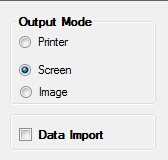
Choosing the Output Mode
When you click on 'Data Import', the options for Printer and Screen and Image become de-selected. But you can select 'Printer' and 'Image' in addition to data export again. Only screen and data import are prohibited because a user could at any time interrupt the complete processing of the file.