|
<< Click to Display Table of Contents >> Selecting a Code Set |
  
|
|
<< Click to Display Table of Contents >> Selecting a Code Set |
|
EDI relies on transaction code sets. These codes represent longer explanations and descriptions. At the onset of EDI one of the main design ideas was to make the EDI files as short as possible and to allow different languages to use the same descriptions by reducing long verbose explanations to 2-3 byte long codes. Computer storage was incredibly expensive and making any file larger than it absolutely had to be was considered wasteful.
At the onset of EDI one of the main design ideas was to make the EDI files as short as possible and to allow different languages to use the same descriptions by reducing long verbose explanations to 2-3 byte long codes. Computer storage was incredibly expensive and making any file larger than it absolutely had to was considered wasteful.
The code sets are stored in the file codesets.xml in the Configuration subdirectory:
Windows XP: C:\Documents and Settings\All Users\Application Data\HIPAAsuite\HIPAA Premium Payment Master\Configuration\
Windows 7, Vista: C:\ProgramData\HIPAAsuite\HIPAA Premium Payment Master\Configuration\
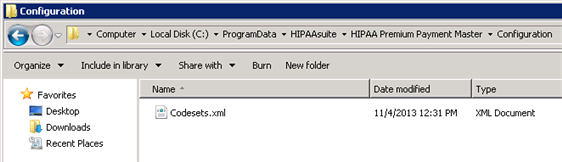
The Configuration folder in Windows 7
Tip: The folder is hidden.
To view/edit transaction code sets in HIPAA Premium Payment Master, follow the instructions below.
| 1. | Go to the "Code Sets" item in the main menu. 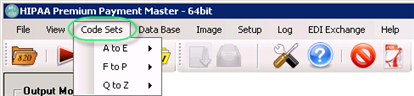 The "Code Sets" menu |
| 2. | From the sub-menu, select a code set name. The following menu items are available via the "Code Sets" menu: A to E |
| • | Credit Codes |
| • | DFI Codes |
| • | Date Codes |
| • | Entity ID Codes |
F to P
| • | Handling Codes |
| • | ID Codes |
| • | Pay Adjustment Codes |
| • | Payment Action Codes |
| • | Payment Format Codes |
| • | Payment Method Codes |
Q to Z
| • | REF Codes |
| • | Report Transmission Codes |
| • | SAC Codes |
| • | Unit Codes |
The following screen-shot illustrates how to select the "ID Codes" for display.
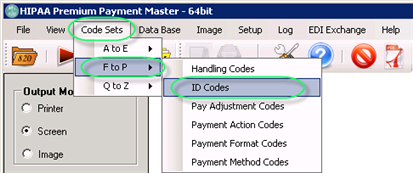
The "ID Codes" sub-menu
| 3. | The code set configuration window will be displayed. You can add, delete or edit codes. Read further how. Below you can see this window for the ID Codes. The window provides the following information: |
| • | Number of records in codeset — The total number of codes. For example, for ID Codes it is equal to 31. |
| • | Codes and their corresponding descriptions. The codes are indicated in the source EDI files. The descriptions are displayed instead of codes in the result easy-to-read files. For example, for ID there are the following codes and corresponding descriptions: |
| • | 1 — D-U-N-S Number |
| • | 9 — D-U-N-S+4 Number |
| • | 21 — Health Industry Number |
| • | 24 — Federal Employer ID |
| • | etc. |
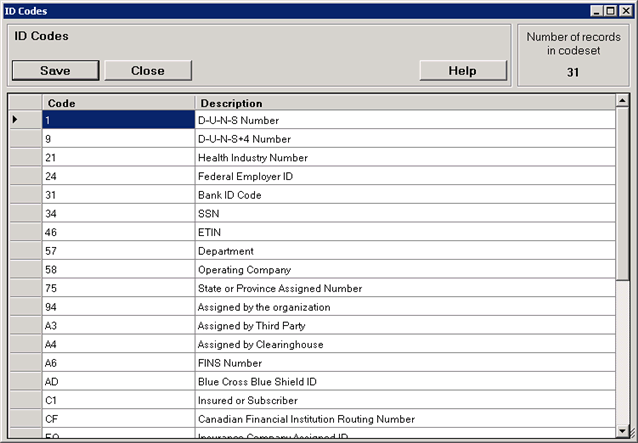
The "ID Codes" configuration window
| 4. | Click on the "Save" button to save the changes. |
To add, click on the last row. Now you can see the indicator in the first grey field.
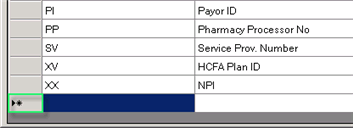
The indicator
Click the field again to enter to the Edit mode. Now you can enter the text.
Note: Only after you leave this row, the changes will take place.
To delete, click the left margin. This action will highlight the whole row.
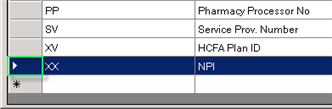
Highlighting a row by clicking the left margin
Now press the <DELETE> key on your keyboard.
To edit, click two times the cell you want to change. Make your changes. Clicking or moving outside this cell makes the changes to be "sticked."
Notice: Don't forget to save the changes by pressing the 'Save' button.