When you select the menu item 'Setup --> Application Setup' you will see the following screen:
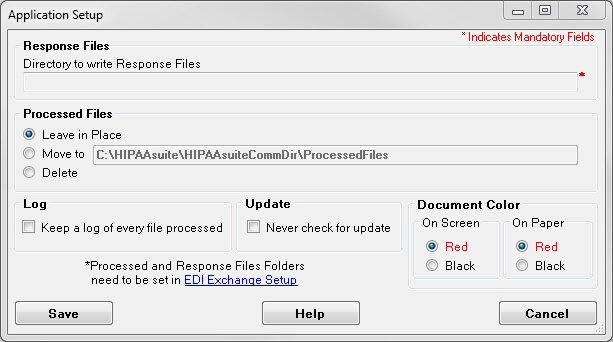
The Setup screen
Here you can select important settings for the application.
First there are paths to two important folders:
| • | The output directory. This is the folder where response files will be created in. |
| • | The processed file directory. If you want to move your request files after they have been processed into an archive folder and get them out of the way, this is your folder |
Then you can
| • | Determine whether you want to write every file processing to the log file, even manually processed files. We recommend this setting. |
| • | HIPAAsuite products always check for the availability of product upgrades. If you find this annoying and the current version works for you, you can turn off the update check |
| • | You can select the document color on screen and on paper for better readability |
The last note refers to the EDI Exchange module. If it is licensed and activated then the two directories are set through EDI Exchange's setup