|
<< Click to Display Table of Contents >> Preview Display |
  
|
|
<< Click to Display Table of Contents >> Preview Display |
|
To best explain how the 999 image is rendered, below is an example 999 file viewed in the EDI Editor:
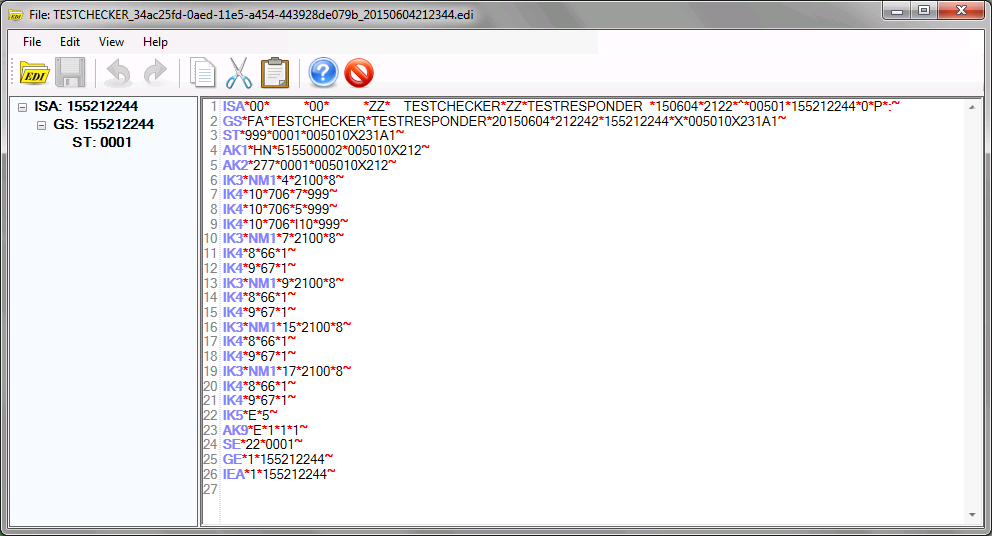
Example 999 viewed via EDI Editor.
The same file rendered as an image:
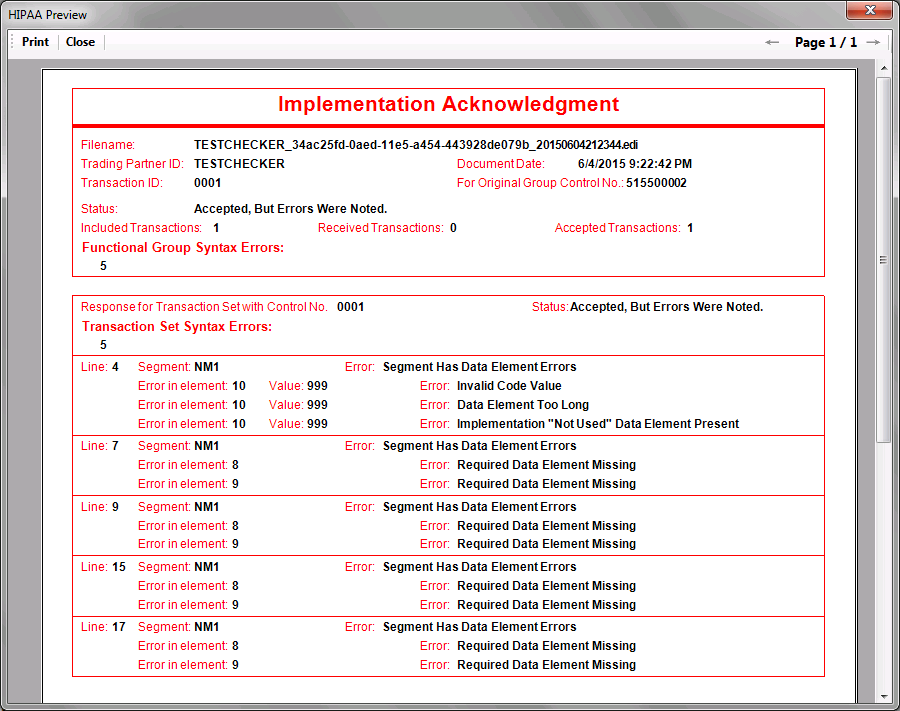
Example 999 rendered from database record.
Filename: Name of file containing this 999 Transaction
Trading Partner ID: Remote trading partner's identifier
Transaction ID: ST 02 - Transaction Set Control Number. The Transaction Set Control Numbers in ST02 and SE02 will be identical. The number is assigned by the originator and must be unique within a functional group.
Document Date: Date this file was generated.
Original Group Control No: AK1 02 - Group Control Number. Uses the value in GS06 from the functional group to which this 999 transaction set is responding.
Status: AK9 01 - Functional Group Acknowledge Code.
Included Transactions: AK9 02 - Total number of transaction sets included in the functional group or interchange group. This element contains the value in element GE 01 of the original file being acknowledged.
Received Transactions: AK9 02
Accepted Transactions: AK9 03
Response for Transaction Set: Transaction Set ID
Functional Group Syntax Errors: Amount of errors within functional group.
Status: IK5 01 - Transaction Set Status.
Transaction Set Syntax Errors: Amount of errors (IK3 segments) in transaction set.
Syntax and Element errors (IK3 & IK4)
Line: IK3 02 - Segment Position in Transaction Set. Contains the location of the segment in error from the "ST" segment. The third segment after the "ST" would have a value of "4".
Segment: IK3 01 - Segment ID Code. The identification of the data segment in error (e.g. "NM1" or "SV1").
Error: IK3 04 - Segment Syntax Error Code. This code contains the error noted for the segment. A more detailed error code is included in child segment IK4, along with the position and value of the element in error.
Error in element: IK4 01 - Element Position in Segment. Indicates the relative position of a data element. The IK4 may be further divided into IK4 01-2, denoting the component data element position in a composite value, and IK4 01-3, denoting the repeating data element position.
Value: IK4 04 - Copy of Bad Data Element. If present, a copy of the data element in error.
Error: IK4 03 - Element Syntax Error Code. This code details why the element in in error. This could be due to a missing required element, syntax errors in the element such as too many or too few characters,or use of invalid characters, among others.