|
<< Click to Display Table of Contents >> Data Export |
  
|
|
<< Click to Display Table of Contents >> Data Export |
|
The HIPAA 999 Master does not include a database. It can instead link to any ODBC- or OleDB-compliant database.
Most businesses that do HIPAA transactions have a database engine on their premises. Microsoft SQL Server is probably the most widely used business database; Oracle or IBM database also have broad acceptance. The open source and free database MySQL finds more and more acceptance in the business world and is great for developers.
The HIPAA 999 Master uses four database tables for the functional/implementation acknowledgment information:
| • | an implementation acknowledgment table |
| • | a transaction response table listing the individual transactions per acknowledgment file |
| • | a segment error table listing the non-compliant or otherwise rejected segments in each transaction |
| • | an element notes table listing any elements in error in the segment error table |
Scripts are provided to create these tables for some database types. You might have to modify the scripts to suit your actual taste of the SQL language.
Once these tables are created, implementation acknowledgments from EDI files can be loaded into this database. Your application can take the claim information from there and you can run your business logic on these records. The HIPAA 999 Master can, in turn, read the database record and re-create the acknowledgment image from the database.
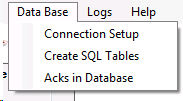
The "Data Base" menu
The sequence of actions to setup the data export is the following:
The HIPAA 999 Master provides the "Data Import" option. In the "Screen" mode, the data import will does not work since you can interrupt the viewing of EDI claims at any time and this might lead to incomplete data import.
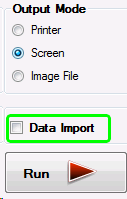
The "Data Import" check-box
The data is exported once the user clicks on the "Run" button. The data is written to the database once the "Run" button has been clicked and only if the "Data Import" checkbox is activated.