To generate an 820 payment order/remittance advice file using the Database, the following command line arguments are needed in order:
| 1. | Query - The full query to generate the desired transactions. Querying multiple rows will result in an 820 with multiple transactions. |
| 2. | "EDI" - To flag the query for EDI file creation. |
| 3. | Resulting filename - A filename for the resulting file. A fully qualified path may be used. A relative address (ex: "\820forTradingPartner\820.edi") will result in the file being written to the EDI Root directory. |
| 4. | Trading Partner - The trading partner to be used to build the ISA and GS segments. If this argument is left blank, the last Trading Partner used to build an EDI file in the Create 820 Transaction Sets window will be used.
|
Example of creating an EDI file from a database query:

EDI file creation command specifying records with a query.
The above example has:
| • | A query in the first argument. |
| • | The second argument is 'EDI', meaning that an EDI file is to be created using the results from a SQL query. |
| • | Argument 3 is the filename for the resulting file. Since D:\EDI\TEST820_06.edi is a fully qualified path, the file is not written to the EDI Root directory and instead uses the specified path. |
| • | The fourth argument specifies the ISA identifier of the destination trading partner. This works only with the EDI Exchange module enabled. |
and will result in an EDI file named "TEST820_06.edi" in "D:\EDI\" containing the results of database query "SELECT TOP 2 * FROM EDI_Payments". The following is the log entry created by this command:
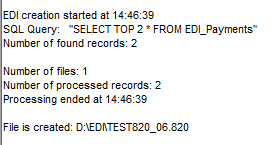
Excerpt of HIPAA Premium Payment Master log.


