When you click the 'Reject' button you will be confronted with the Response: Reject Eligibility Benefit Inquiry screen:
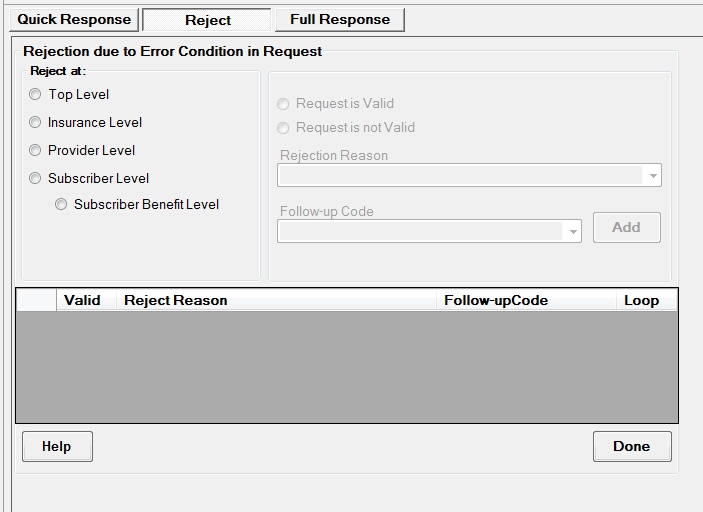
The Reject screen
You can see in the left upper part of the screen an options menu. Here you have to choose at which level the request is to be rejected. Accordingly, the Reject Reasons will be available. Each level has different reject reasons. The most likely reason to reject is that the provider is not in the network or the subscriber/patient is not on file.
| • | Top Level:Required when the request could not be processed at a system or application level based on the entities identified in ISA06, ISA08, GS02 or GS03 and to indicate what action the originator of the request transaction should take. Below are valid reject reasons for Top level rejections |
04 Authorized Quantity Exceeded
41 Authorization/Access Restrictions
42 Unable to Respond at Current Time
79 Invalid Participant Identification
| • | Insurance Level:Required when the request could not be processed at a system or application level when specifically related to the information source data contained in the original 270 transaction’s information source name loop (Loop 2100A). it also indicates that the information source itself is experiencing system problems and to indicate what action the originator of the request transaction should take. Below are the valid reject reasons for an insurance level rejection |
04 Authorized Quantity Exceeded
41 Authorization/Access Restrictions
42 Unable to Respond at Current Time
79 Invalid Participant Identification
80 No Response received - Transaction Terminated
T4 Payer Name or Identifier Missing
| • | Provider Level:Required when the request could not be processed at a system or application level when specifically related to the information receiver data contained in the original 270 transaction’s information receiver name loop (Loop 2100B) and to indicate what action the originator of the request transaction should take. Below are the valid reject reasons for an provider level rejection |
15 Required application data missing
41 Authorization/Access Restrictions
43 Invalid/Missing Provider Identification
44 Invalid/Missing Provider Name
45 Invalid/Missing Provider Specialty
46 Invalid/Missing Provider Phone Number
47 Invalid/Missing Provider State
48 Invalid/Missing Referring Provider Identification Number
50 Provider Ineligible for Inquiries
51 Provider Not on File
79 Invalid Participant Identification
97 Invalid or Missing Provider Address
T4 Payer Name or Identifier Missing
| • | Subscriber or Dependent Level:Required when the request could not be processed at a system or application level when specifically related to the data contained in the original 270 transaction’s subscriber name loop (Loop 2100C) and to indicate what action the originator of the request transaction should take. |
15 Required application data missing
35 Out of Network
42 Unable to Respond at Current Time
43 Invalid/Missing Provider Identification
45 Invalid/Missing Provider Specialty
47 Invalid/Missing Provider State
48 Invalid/Missing Referring Provider Identification Number
49 Provider is Not Primary Care Physician
51 Provider Not on File
52 Service Dates Not Within Provider Plan Enrollment
56 Inappropriate Date
57 Invalid/Missing Date(s) of Service
58 Invalid/Missing Date-of-Birth
60 Date of Birth Follows Date(s) of Service
61 Date of Death Precedes Date(s) of Service
62 Date of Service Not Within Allowable Inquiry Period
63 Date of Service in Future
71 Patient Birth Date Does Not Match That for the Patient on the Database
72 Invalid/Missing Subscriber/Insured ID
73 Invalid/Missing Subscriber/Insured Name
74 Invalid/Missing Subscriber/Insured Gender Code
75 Subscriber/Insured Not Found
76 Duplicate Subscriber/Insured ID Number
78 Subscriber/Insured Not in Group/Plan Identified
| • | Subscriber or Dependent Benefit Level:Required when the request could not be processed at a system or application level when specifically related to the data contained in the original 270 transaction’s dependent name loop (Loop 2100D) and to indicate what action the originator of the request transaction should take. |
15 Required application data missing
35 Out of Network
42 Unable to Respond at Current Time
43 Invalid/Missing Provider Identification
45 Invalid/Missing Provider Specialty
47 Invalid/Missing Provider State
48 Invalid/Missing Referring Provider Identification Number
49 Provider is Not Primary Care Physician
51 Provider Not on File
52 Service Dates Not Within Provider Plan Enrollment
56 Inappropriate Date
57 Invalid/Missing Date(s) of Service
58 Invalid/Missing Date-of-Birth
60 Date of Birth Follows Date(s) of Service
61 Date of Death Precedes Date(s) of Service
62 Date of Service Not Within Allowable Inquiry Period
63 Date of Service in Future
64 Invalid/Missing Patient ID
65 Invalid/Missing Patient Name
66 Invalid/Missing Patient Gender Code
67 Patient Not Found
68 Duplicate Patient ID Number
71 Patient Birth Date Does Not Match That for the Patient on the Database
77 Subscriber Found, Patient Not Found
When you select Subscriber or Patient Benefit Level, drop down box appears that lets you select which benefit line is rejected.

The drop-down box that let's you choose the benefit line of the request.
According to the reject reason select a meaningful follow-up code. There are:
C Please Correct and Resubmit
N Resubmission Not Allowed
R Resubmission Allowed (Use only when AAA03 is “42".)
S Do Not Resubmit; Inquiry Initiated to a Third Party
W Please Wait 30 Days and Resubmit
X Please Wait 10 Days and Resubmit
Y Do Not Resubmit; We Will Hold Your Request and Respond Again Shortly (Use only when AAA03 is “42".)
Once you are done, click on the 'Save' button and return to the request screen.