From the menu 'Image' you can reach the Image Options screen
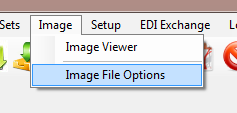
The 'Image' Menu
and the following screen comes up
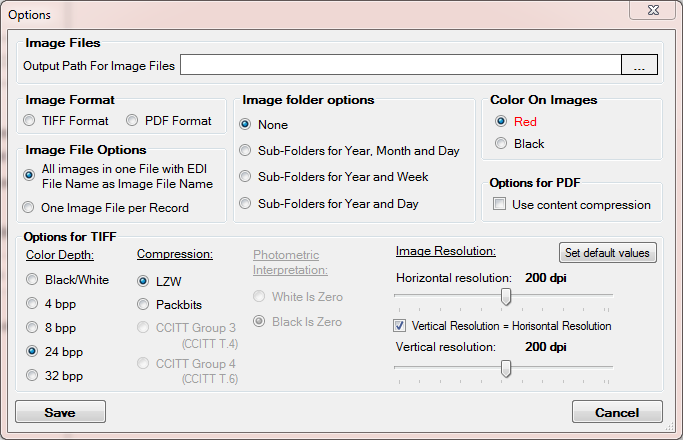
Setting up the image file options
You can configure the following options:
| • | Set the directory where image files will be saved |
| • | Set image file and folder options |
| • | Determine image format |
| • | Determine options for PDF and TIFF files |
| • | Determine the document background color for images |
Read the detailed descriptions further.
3. Once you have finished editing the options, click "Save."
The settings are saved to the Windows registry and will be retained for the next time you run the program. Check your permissions to write to the registry if you encounter any problems with saving settings. Your administrator might help you.
Image Files
| • | Output Path for Image Files — Define the destination folder where the images will be stored. See also Creating Image Files. |
Image Format
Choose whether to create PDF or TIFF files.
| • | TIFF |
| • |
Image File Options
The following options are available:
Image Folder Options
When you create a lot of images, it is important not to place them all in the same folder. Microsoft Windows has issues handling more than 1000 files in a folder. That is the reason why the HIPAA Claim Payment Master can hash the image files over many sub-folders. You have the following choice to use:
| • | None — Default value. |
| • | Sub-folders for Year-Month and Day — The sub-folders will be created within the Image File Location. Example: \2012\February\29\. |
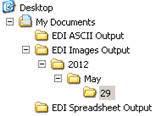
The folder structure in "Year, Month and Day" mode
| • | Sub-folders for Year and Week — The sub-folders will be created within the Image File Location. Example: 2012\9\. |
| • | Sub-folders for Year and Day — The sub-folders will be created within the Image File Location. Example: 2012\20120229\. |
Color on Images
| • | Choose a color for the form when saving claims to image files. You have the choice to render the form in red or in black. |
Note: The data is always black.
Options for PDF
| • | Use Content Compression — Checking this option does result in considerably smaller files. |
Options for TIFF
| • | Color Depth — You can change color depth of the image (black / white, 4 bpp / 8bpp / 24bpp / 32bpp). |
Note: TIFF in Window's GDI library does not work with 16 bpp (bits per pixel). Color depths set lower than 16 bpp results in some losses in image quality.
| • | Compression Algorithm — You can use compression with TIFF files: LZW and Packbits is used for all Colors, CCITT4 for black and white. |
| • | Image Resolution — You can change the resolution of image from 96 to 300 dpi (dots per inch). |
Note: Theoretically we could use even higher resolutions, but it will slow down processing significantly and result in approximately the same result in quality.