|
<< Click to Display Table of Contents >> Configuring Program Options |
  
|
|
<< Click to Display Table of Contents >> Configuring Program Options |
|
To configure the HIPAA 999 Master, select Setup  Options
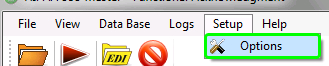
Program Options Setup menu item
or click on the "Setup" button on the Main Toolbar.
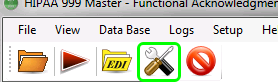
Program Options Setup button on toolbar
The following window will appear:
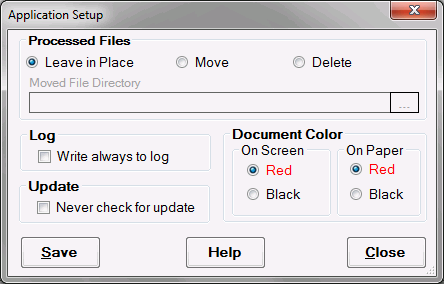
Setup options window
The Application Setup window contains options in the following sections:
Processed Files - Determines whether a 999 file will be left in place, moved, or deleted after processing. If "Move" is selected, a folder must be specified to store the processed files in.
Log - Check "Always write to log" to write events to log, not only errors or exceptions.
Update - Check "Never check for update" to remain on the same program version even if an update were available.
Document Color - Select the document color to be viewed on the screen and on paper (printed). It may be easier to look through a document in a color brighter than black.