|
<< Click to Display Table of Contents >> Renaming Fields to Export |
  
|
|
<< Click to Display Table of Contents >> Renaming Fields to Export |
|
There are a few reasons why you would want to use different field names than the ones given by the HIPAA 999 Master:
| • | Your database cannot handle long column names such as "OriginalTransactionControlNo". |
| • | You already have a staging table and want to import the data straight into your own table which has different field names. |
HIPAA 999 Master lets you change the names of the columns that you selected for export. All you have to do is:
| 1. | Check the box near the field for import. |
| 2. | Click the field name twice. Do not double-click, but select the field, then click it once more. You will see that the field name is now editable. |
| 3. | Change the name to your value and click somewhere outside the field. |
| 4. | Your field name has now been changed. |
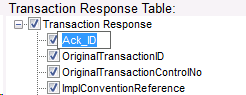 Changed to: Changed to: 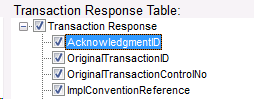 Editing a field name |
The new value will be saved as long as this field is selected for Import. If you unselect the field and save your selection, the field will revert to its original name.
Notice: Field names must not contain spaces.