|
<< Click to Display Table of Contents >> Using Command Line Arguments |
  
|
|
<< Click to Display Table of Contents >> Using Command Line Arguments |
|
The HIPAA Premium Payment Master can also accept command line arguments. This is a very important feature if you want to put the HIPAA Premium Payment Master on a scheduler and automate the processing of files or directories. Refer to Running the Application via Scheduler.
The following is the list of the command line arguments; they must be separated by commas.
| 1. | The first command line argument is the filename or the directory path. If not applicable, leave blank. |
| 2. | The second through fourth arguments following a filename or directory path are reserved for processing options and are triggered by a "Y" as followss: |
| • | 2nd argument — Export to database. Using the Export to Database option as a Command Line Argument |
| • | 3rd argument — TIFF/PDF File. The payment order/remittance advice will be saved as a TIFF image file. See Creating Image Files from EDI for details on how to set up the Image printing capabilities. Be sure that you have tested the Image printing, before trying the command line mode.  Using the TIFF/PDF Image option as a Command Line Argument |
| • | 4th argument — Print. If the fourth argument following a filename or directory path is filled with a "Y", the 820 file will be printed without ever being displayed Using the Print option as a Command Line Argument Again, be sure that you have tested the Image printing before trying the command line mode. |
You can have a combination of the above arguments. For example,

will both export the "820_1.edi" file to the Database and print the file.
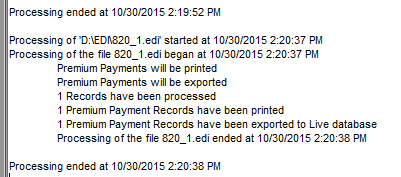
Excerpt from HIPAA Premium Payment Master log after command line processing.